How Does WP 1 Click LockDown Stack Up?
Compare WP 1 Click LockDown against other popular WordPress security solutions to see why 3,200+ sites choose us.
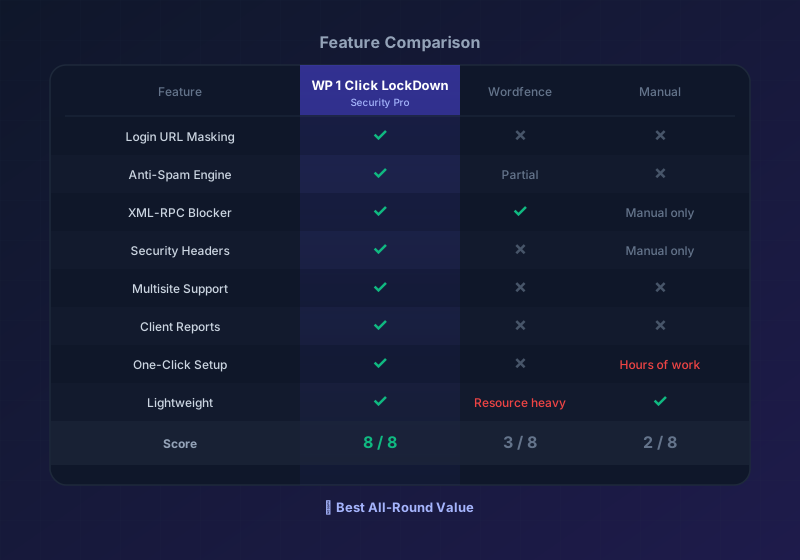
How WP 1 Click LockDown Compares
See how WP 1 Click LockDown stacks up against other security solutions.
| Feature | WP 1 Click LockDown Security Pro | Wordfence Free | iThemes Security | Manual Hardening |
|---|---|---|---|---|
| Login URL Masking | ||||
| Anti-Spam Engine | ||||
| XML-RPC Blocker | ||||
| Security Headers | ||||
| Brute Force Protection | ||||
| Multisite Support | ||||
| Client Reports | ||||
| One-Click Setup | ||||
| Lifetime Updates | ||||
| Affordable | ||||
| No Bloat/Fast | ||||
| Easy to Use |
WP 1 Click LockDown offers the best combination of features, ease of use, and value. Built specifically for WordPress site owners who want security without complexity.
Why Choose WP 1 Click LockDown?
Complete Package
Get all essential security features in one plugin. No need to combine multiple tools or pay for separate services.
Affordable Pricing
Starting at just $49/year for single sites, or $399 lifetime for unlimited sites. No surprise renewal fees or hidden costs.
Easy to Use
One-click activation. No complex settings or configuration required. Works perfectly with default settings.
Actively Maintained
Regular updates, responsive support, and continuous improvements. Not abandoned or neglected like some security plugins.
Honest Claims
We don't claim to be perfect. We're honest about what WP 1 Click LockDown can and can't do. No fake guarantees.
Agency Ready
Built for agencies. Manage 25+ sites, white-label reports, team collaboration, and bulk operations.
Understanding Your Options
Wordfence Free
A solid option for basic security. Good login page protection, firewall basics, and brute force blocking.
But: Missing anti-spam, no multisite support, limited headers management, can be resource-heavy on shared hosting.
WP 1 Click LockDown vs Wordfence: Both are good, but WP 1 Click LockDown is lighter, cheaper (for premium features), and includes anti-spam. Wordfence's paid versions offer more advanced features if you need them.
iThemes Security
Comprehensive plugin with lots of options. Good for users who want granular control over settings.
But: More complex setup, expensive pro features, steeper learning curve, can slow down older servers.
WP 1 Click LockDown vs iThemes: If you want simplicity and affordability, WP 1 Click LockDown wins. If you want maximum configurability, iThemes has more options. Both are legitimate choices—it depends on your needs.
Manual Hardening
Some experts recommend manually hardening WordPress by editing .htaccess, wp-config.php, and adding server-level rules.
But: Requires technical knowledge, error-prone, no support if things break, hard to maintain across updates.
WP 1 Click LockDown vs Manual: WP 1 Click LockDown automates hardening and eliminates risk. Unless you're an expert, manual hardening is more work with higher risk of mistakes.
Sucuri & Managed Services
Enterprise-grade security with 24/7 monitoring, malware scanning, and managed firewall. Top-tier protection.
But: Very expensive ($500+/year), overkill for most sites, requires managed hosting or plugins.
WP 1 Click LockDown vs Sucuri: Sucuri is for sites handling sensitive data or high-value targets. WP 1 Click LockDown is the baseline hardening every site should have, at a fraction of the cost.
Ready to Choose the Right Security Solution?
WP 1 Click LockDown offers the best balance of features, ease, and affordability for WordPress sites.
Trusted by these site owners: